
Data migration is a critical component of any social security system implementation. Social security data represents legally binding information, including insured person identities, contribution histories, benefit entitlements, and payment records. Errors or inconsistencies introduced during migration can directly result in incorrect benefit calculations, improper payments, compliance issues, audit findings, and operational disruption. For this reason, data integrity is a primary design and execution concern in social security modernization projects.
Unlike typical enterprise systems, social security platforms manage highly relational and longitudinal data. Records span decades, are effective-dated, and are subject to policy changes, recalculations, and exceptions. Data elements are interdependent across registration, contributions, benefits, and payments. Successful migration therefore requires preserving not only data values, but also historical relationships, sequencing, and policy context.
Data migration is a determining factor in overall project timelines. Legacy data quality, completeness, and structure directly affect the duration of data mapping, validation, and reconciliation activities. Issues such as duplicate identities, inconsistent code tables, missing historical periods, and undocumented legacy rules frequently require remediation before data can be accepted into the target system. Not addressing these issues from the start in the project will result in schedule extensions and delayed go-live. For this reason, data migration activities are initiated early and executed iteratively alongside system discovery and implementation.
The client plays a central role in the data migration process. The client is responsible for understanding the legacy data, performing data extraction, cleansing source data, and completing data migration templates based on agreed mappings. This ensures that institutional knowledge about data meaning, exceptions, and historical practices is applied before data is loaded into the new system. 2Interact provides the data migration tools, validation mechanisms, audit reporting, and technical support required to import, verify, and accept the data into Interact SSAS, but the quality and readiness of the migrated data depend directly on client participation.
This collaborative approach ensures that data migration is treated as a governed, auditable process rather than a late-stage technical exercise, reducing implementation risk and supporting long-term system integrity.
Data Migration Plan
From its inception, Interact SSAS and other Interact Applications were developed to have built-in Data Conversion/Migration tools as we recognize that Interact Applications are deployed in existing organizations with legacy systems and their associated data. For this we use Interact’s Data Conversion/Migration Tools Data Migration Export/Import Spreadsheets (DMEIS), where data from the source Database is exported to DMEIS, then the DMEIS are imported to Interact SSAS Database. During the Data Import Process Interact DM Tools validate and audit the data to ensure that the data to be Migrated/Imported to Interact SSAS Database is:
- Complete
- Valid
- Not-Duplicated
- Counted
- Tracked
- Audited
- Date/Time Stamped
Various Audit Reports are available to the User to verify that the Data Migrated is complete, accurate, and valid before it is committed to the Interact SSAS Database. During the Data Migration process extensive use of Alert Messages informs the user of Data Issues as well as the progress of the Data Migration progress. See Diagram below:
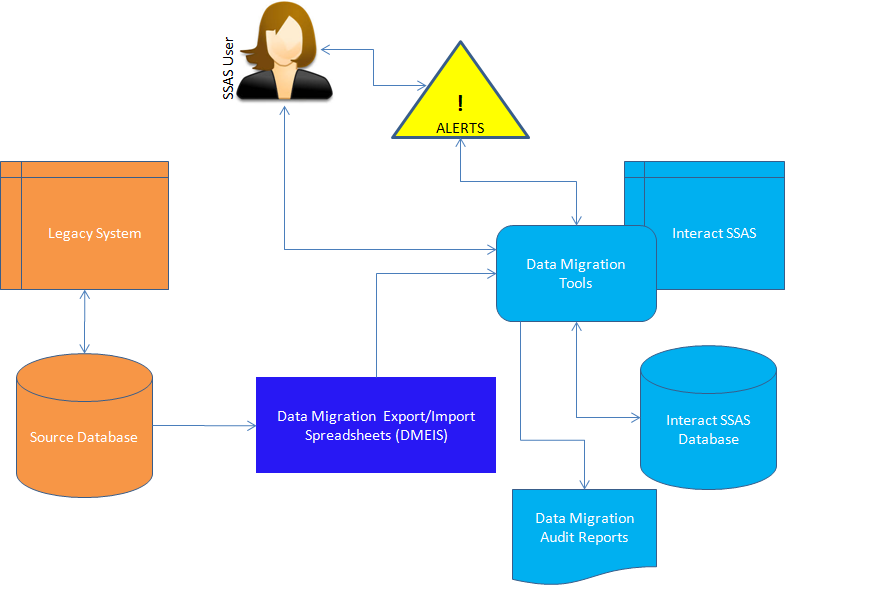
Figure 1: Data Conversion Methodology
The Interact Data Conversion/Migration Methodology includes the following steps/processes:
- Data Mapping – This process consists of mapping the Legacy System Database Tables Fields/Attributes to Interact SSAS Database Tables Fields/Attributes – this task is performed by the Client
- Code Tables to Policies Mapping – This process consists of identifying all the Code Tables and their contents in the Legacy System and map them to Interact SSAS Policy Tables – this task is normally performed by the Client
- Export Data from Legacy System – This process consists of Exporting the Data from the Legacy System Database to Interact Export/Import Data Spreadsheets (IEIDS) using the Data Mapping and Code Tables to Policies Mapping generated by the Data Mapping Process and Code Tables to Policies Mapping processes.
- Verify the Exported Data – Once the IEIDS are generated, they are verified
- Import Data to Interact SSAS Database – This process requires the generated IEIDS from the export process after verification which will then be imported into the Interact SSAS Database. This process is interactive and provides the consultant conducting the data migration with informative alerts and rejection alerts
- Data Migration Reports – These reports are used to verify that the data migration is successful. The reports include Migrated Data Statistics, Counts, Rejects, Reason for Reject, etc
- Verify and QA Migrated Data
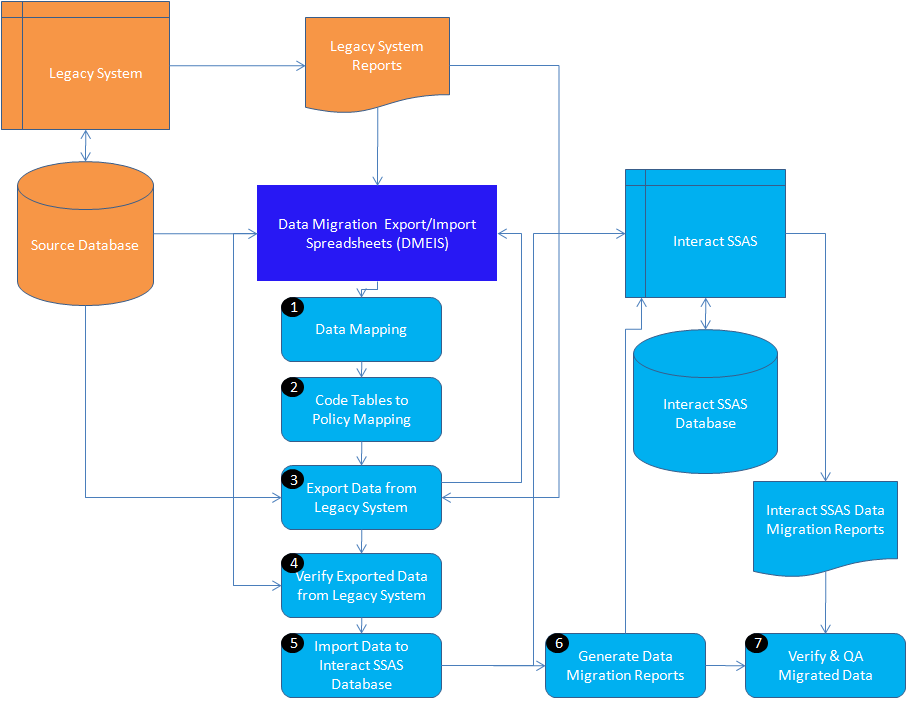
Figure 2: Data Migration Steps